Evaluate OpenDesk on T Cloud Public
This blueprint walks through deploying an OpenDesk instance for evaluation and testing purposes on T Cloud Public. All databases, caches, and object storage components are deployed as containers within the cluster.
For a production-grade setup with high availability and managed services, refer to the Deploy OpenDesk on CCE.
The configuration files and patches used in this guide are available in the OpenDesk Blueprints Repository.
Prerequisites
Infrastructure Resources
A CCE cluster with adequate compute and memory resources is required to operate the complete stack, which consists of more than 35 pods.
| Resource | Requirement |
|---|---|
| CPU | 12 Cores (x64/x86) |
| RAM | ≥ 32 GB |
| Disk | > 10 GB (HDD or SSD) |
For detailed hardware and software requirements, refer to the official requirements documentation.
Required Tools
- kubectl: Configured to access your CCE cluster.
- Helm: Version ≥ 3.17.3 (Avoid 3.18.x as it has known issues with some charts).
- Helmfile: Version ≥ 1.0.0.
- helm-diff: Plugin version ≥ 3.11.0.
Cluster Dependencies
Before deploying openDesk, ensure that the CCE cluster meets the following prerequisites:
-
Ingress NGINX Controller (≥ 1.11.5):
These flags are required in the configMap of the ingress-nginx-controller
ingress-nginx-controller.configMapdata:
allow-snippet-annotations: "true"
annotations-risk-level: Critical
strict-validate-path-type: "false"importantIf these settings are not configured, openDesk components that rely on configuration snippets or specific path types may fail to deploy correctly or may not route traffic as intended.
-
cert-manager:
✅ Must be installed with a
ClusterIssuer(usually Let's Encrypt)
✅ Must support DNS-01 challenges for wildcard certificatesnoteFor instructions on configuring cert-manager with a DNS-01 solver, refer to: Issue ACME Certificates on OTC.
-
Default Storage Class:
✅ Ensure
csi-disk-topologyis set as default storage class, or configure it explicitly in the values.
Solution Overview
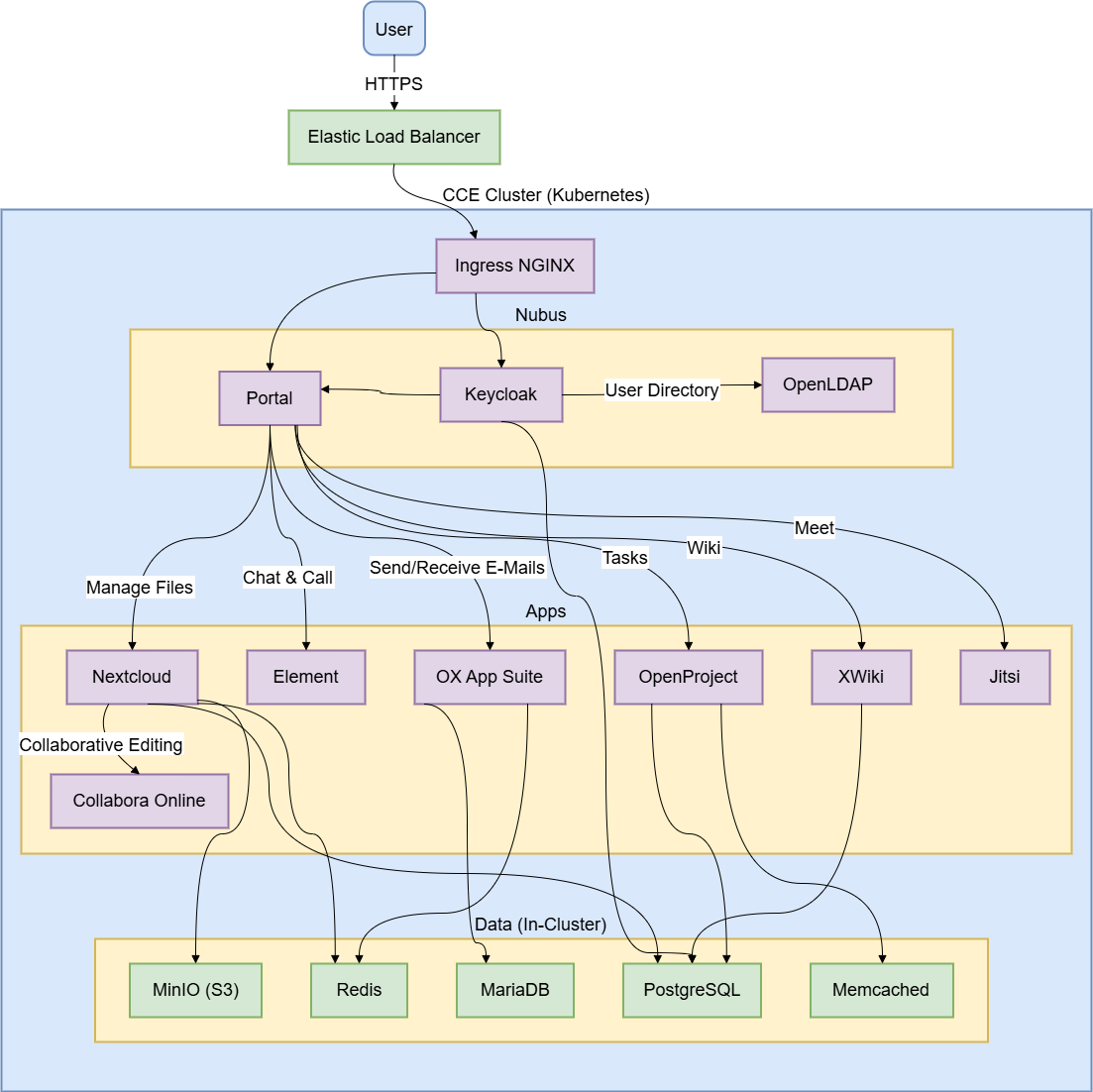
The following diagram outlines the openDesk architecture on CCE, highlighting how the application components run within the cluster and are exposed externally through the Elastic Load Balancer.
Deployment
Configuring DNS Records
Before starting the deployment, configure the required DNS records so that they resolve to the Elastic Load Balancer (ELB).
| Valid Hostnames | Type | Value | Purpose |
|---|---|---|---|
*.opendesk.example.com | A | <ELB_IP_ADDRESS> | Wildcard for all web subdomains |
opendesk.example.com | A | <ELB_IP_ADDRESS> | Base domain |
Replace the placeholder value <ELB_IP_ADDRESS> with the one that corresponds to the external IP of the LoadBalancer service associated with NGINX in the cluster.
In this evaluation setup, DKIM is disabled and email is sent directly from the cluster IP without a relay. Most public email providers (Gmail, Outlook, etc.) will reject these emails due to missing reputation and authentication.
For reliable email configuration, refer to the guide: Deploy OpenDesk on CCE.
Cloning the Repository
Clone the upstream openDesk deployment repository:
git clone https://gitlab.opencode.de/bmi/opendesk/deployment/opendesk.git
cd opendesk
or alternatively, use the T Cloud Public blueprints fork. This option is recommended, as it already includes the fixes and patches described below.
git clone https://github.com/opentelekomcloud-blueprints/openDesk-deployment
cd opendesk
Preparing the Patch Files
The community edition charts currently require three workarounds to run smoothly. Create the following files in helmfile/environments/test:
nubusStackDataUms:
  templateContext:
    opendeskEnterprise: false
nubusKeycloakExtensions:
  proxy:
    securityContext:
      enabled: null
opendeskEnterprise: This parameter has no default value defined in the Helm chart. If it remains unset, thestack-data-umsjob fails during deployment. It is therefore explicitly set tofalse.securityContext: ThenubusKeycloakExtensionschart attempts to configuresecurityContext.enabledon the proxy container. This field is not valid in the Kubernetes API and results in the request being rejected by the Admission Webhook. The configuration is adjusted by removing the field (enabled: null) to ensure successful deployment.
probes:
  liveness:
    enabled: null
  readiness:
    enabled: null
The ox-connector chart incorrectly defines an enabled: true field within its livenessProbe and readinessProbe configurations. This field is not part of the valid Kubernetes Probe specification and results in a deployment failure. The patch removes these invalid entries to ensure the workload can be created successfully.
containerSecurityContext:
  readOnlyRootFilesystem: false
openproject:
  useTmpVolumes: false
OpenProject requires extensive use of temporary directories such as /tmp and /app/tmp. By default, Kubernetes emptyDir volumes do not provide the required sticky bit permissions (mode 1777). As a result, the OpenProject Ruby runtime and seeder jobs may fail with permission-related errors during startup.
This patch:
- Disables the use of these specific temp volumes (
useTmpVolumes: false). - Relaxes the
readOnlyRootFilesystemconstraint so the container can write to its writable layer instead.
See OpenProject Helm Chart Docs and Data Storage Reference for more details.
If disabling readOnlyRootFilesystem violates your cluster's security policies (e.g., PSP/PSS restrictions), you can:
- Fork the chart, to add an
initContainerthat sets the sticky bit (chmod +t) on theemptyDirvolume. - Use custom PVCs pre-provisioned with the required permissions.
The approach described here is intended for evaluation purposes. It provides the simplest way to complete the deployment, but it does not represent the most secure option.
Configuring an Environment
Create the following file: helmfile/environments/test/values.yaml.gotmpl.
Replace the placeholder values below with the corresponding details from your environment.
global:
  domain: "opendesk.example.com"  # Your base domain

# DKIM is disabled for evaluation
# Notes is not enabled by default, we enable it for evaluation
apps:
  dkimpy:
    enabled: false
  notes:
    enabled: true

# Link to portal support page (Required or portal breaks)
functional:
  portal:
    linkSupport: "https://opendesk.eu/support"

# Networking & Ingress
cluster:
  service:
    type: "LoadBalancer"
  networking:
    # MUST match your CCE Pod Network CIDR (check CCE Console)
    cidr:
      - "172.16.0.0/16"
    # MUST match your ELB Public IP (for Jitsi ICE candidates)
    ingressGatewayIP: <ELB_IP_ADDRESS>

  # Container Runtime should be specified as its not set by default
  container:
    engine: "containerd"

  #  RWX storage is disabled,
  # because for evaluation purposes we don't need pod replication
  persistence:
    readWriteMany:
      enabled: false

# OTC-Specific ELB Annotations
# Attaches services to your existing Enhanced Load Balancer
annotations:
  jitsiJvb:
    serviceExternal:
      kubernetes.io/elb.id: "<YOUR_ELB_ID>"
      kubernetes.io/elb.class: performance
      kubernetes.io/elb.lb-algorithm: ROUND_ROBIN
  openxchangePostfix:
    serviceExternal:
      kubernetes.io/elb.id: "<YOUR_ELB_ID>"
      kubernetes.io/elb.class: performance
      kubernetes.io/elb.lb-algorithm: ROUND_ROBIN
  openxchangeDovecot:
    serviceExternal:
      kubernetes.io/elb.id: "<YOUR_ELB_ID>"
      kubernetes.io/elb.class: performance
      kubernetes.io/elb.lb-algorithm: ROUND_ROBIN

# TLS
certificate:
  issuerRef:
    name: "letsencrypt-prod" # Your ClusterIssuer name
    kind: "ClusterIssuer"
  wildcard: true

# Storage Classes for OTC
persistence:
  storageClassNames:
    RWO: "csi-disk-topology"
    RWX: "csi-sfsturbo"

# Apply Patches
customization:
  release:
    ums:
      - "../../environments/test/values-nubus-fixes.yaml"
    oxConnector:
      - "../../environments/test/values-oxconnector-probe-fix.yaml"
    openproject:
      - "../../environments/test/values-openproject-tmpdir-fix.yaml"
Configuration Reference
| Key | Description | Example / Note |
|---|---|---|
global.domain | The base domain where openDesk will be accessible. | opendesk.example.com |
cluster.networking.cidr | The CIDR of the cluster's pod network. | Critical By default, some openDesk components assume a standard 10.0.0.0/8 pod network. If this setting mismatches your actual cluster CIDR, internal network policies or Postfix trusted networks may fail, causing connectivity issues. |
cluster.networking.ingressGatewayIP | The Public IP of your ELB. | Jitsi Meet uses WebRTC for video. The JVB (Video Bridge) pod is behind NAT (the ELB). It needs to know its Public IP to advertise to clients in the SDP (Session Description Protocol) packet. |
annotations...elb.id | The ID of your pre-provisioned OTC Elastic Load Balancer. | Must be the same ELB used by Ingress NGINX (matching the DNS records). Used to attach Jitsi/Mail services. |
annotations...elb.class | Specifies the type of OTC Elastic Load Balancer. | Use performance for Dedicated ELB or union for Shared ELB. |
persistence.storageClassNames | Maps openDesk storage requirements to OTC Storage Classes. | csi-disk-topology (EVS) for RWO, csi-sfsturbo (SFS) for RWX. |
certificate.issuerRef | Points to your cert-manager ClusterIssuer. | Ensure this matches the metadata.name of the issuer you created. |
customization.release | Applies the patch files created in the previous step. | These paths are relative to the helmfile execution directory. |
1️⃣ Single Elastic Load Balancer: This evaluation setup uses a single Elastic Load Balancer to handle all openDesk traffic, including HTTP and HTTPS via Ingress, UDP for Jitsi, and TCP for mail services. Ensure that you specify the <ELB_ID> of the same load balancer whose IP address (<ELB_IP_ADDRESS>) was configured during the Configure DNS step.
2️⃣ Why we need to set cluster.networking.cidr: By default, some openDesk components assume a standard 10.0.0.0/8 pod network. If this setting mismatches your actual cluster CIDR, internal network policies or Postfix trusted networks may fail, causing connectivity issues.
3️⃣ Why we need to set cluster.networking.ingressGatewayIP: Jitsi Meet uses WebRTC for video. The JVB (Video Bridge) pod is behind NAT (the ELB). It needs to know its Public IP to advertise to clients in the SDP (Session Description Protocol) packet.
Deploying with Helmfile
Run Helmfile to apply the configuration:
helmfile apply -e test -n opendesk-test --concurrency 0 --skip-diff-on-install
This command:
-e test: selects the test environment-n opendesk-test: deploys into theopendesk-testnamespace--concurrency 0: unlimited concurrent Helm processes (0 = no limit; increases speed)--skip-diff-on-install: Speeds up the initial run by skipping the diff stage for new releases.
Post-Deployment
Access Management Portal
Go to https://portal.opendesk.example.com and log in using:
- Username:
Administrator - and as Password: Retrieve the generated administrator password with the following command:
kubectl get secret ums-nubus-credentials -n opendesk-test -o jsonpath='{.data.administrator_password}' | base64 -d
On the first login with the admin account, you are prompted to set up two-factor authentication (2FA) using an authenticator application.
If you require end users to use 2FA as well, it is a good practice to add their accounts to the dedicated 2FA group, so that 2FA becomes mandatory for them according to your security policies.
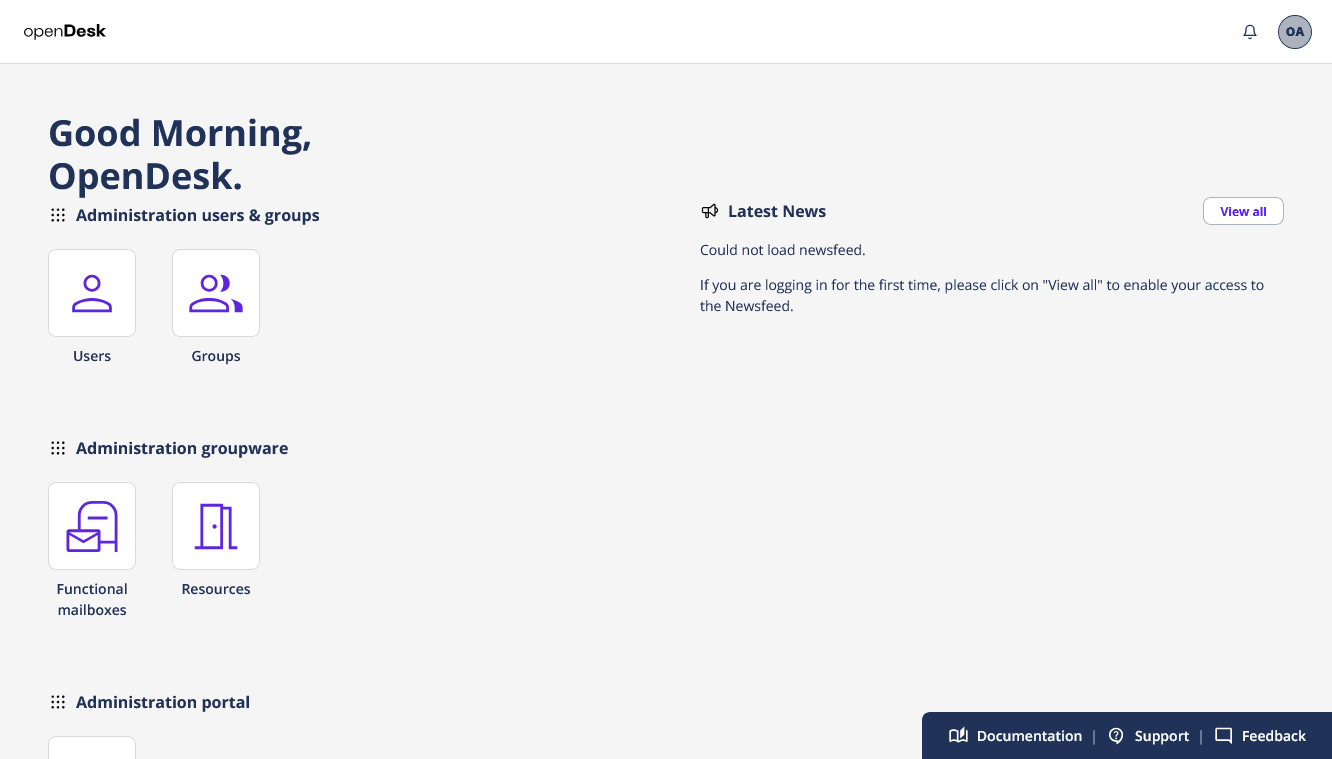
After logging in, you are taken to the management portal, where you can:
- Create and manage users.
- Assign roles and application access to the users.
Create a Test User
- In the management portal, create a new user.
- Make it a member of the Domain Users group.
- Open a new browser session (or incognito window).
- Navigate again to
https://portal.opendesk.example.com. - Log in using the new user's credentials.
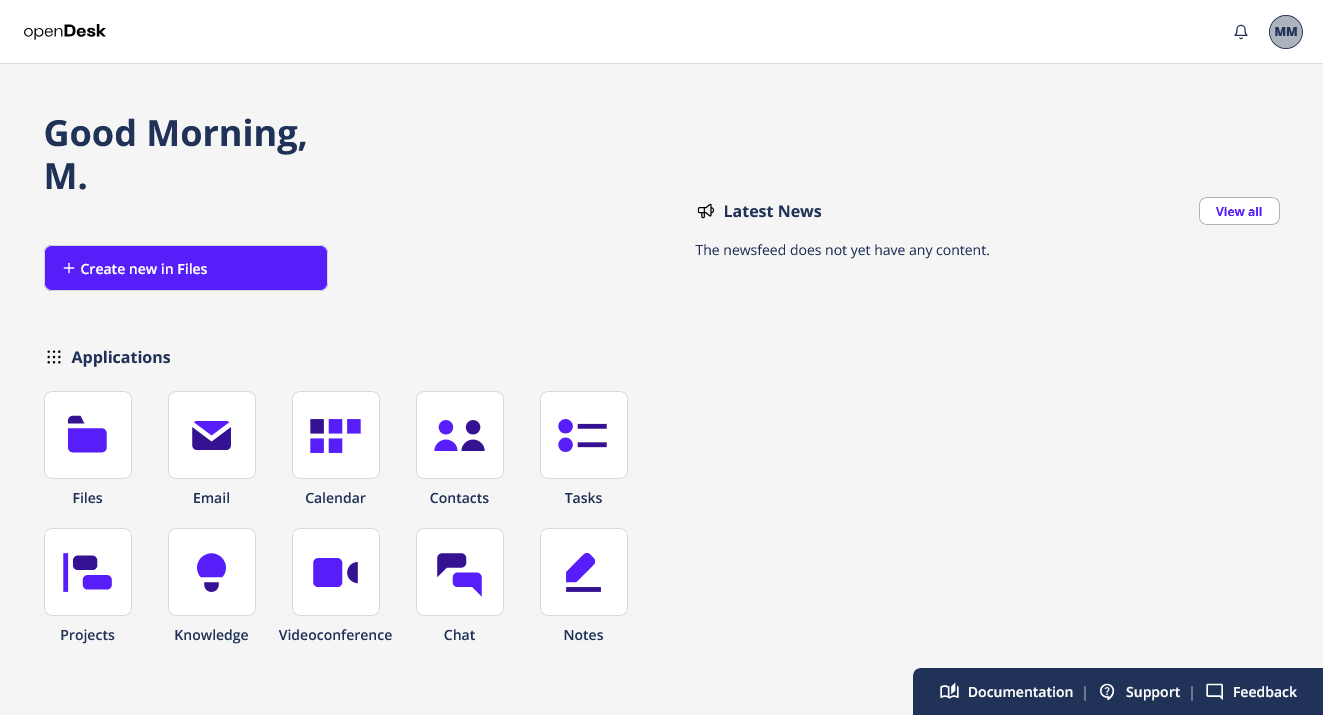
If the login succeeds and the user can access the portal and available apps, your evaluation environment is ready for testing. Make sure to open and verify all provisioned OpenDesk applications to confirm they work as expected.
Uninstall
To remove the installation, execute the following command:
helmfile destroy -e test